Note editing and review
How to Leave Note Feedback
Help improve your clinical documentation by rating and reviewing your progress notes.
Rating your note
After a progress note is generated, you’ll see a feedback section at the top of the note with thumbs up and thumbs down icons.
-
Click thumbs up or thumbs down to indicate your overall satisfaction
-
Choose Good or Needs work in the Rate this note form
-
Add an optional reason and comment, then click Submit. For existing feedback, click Update.
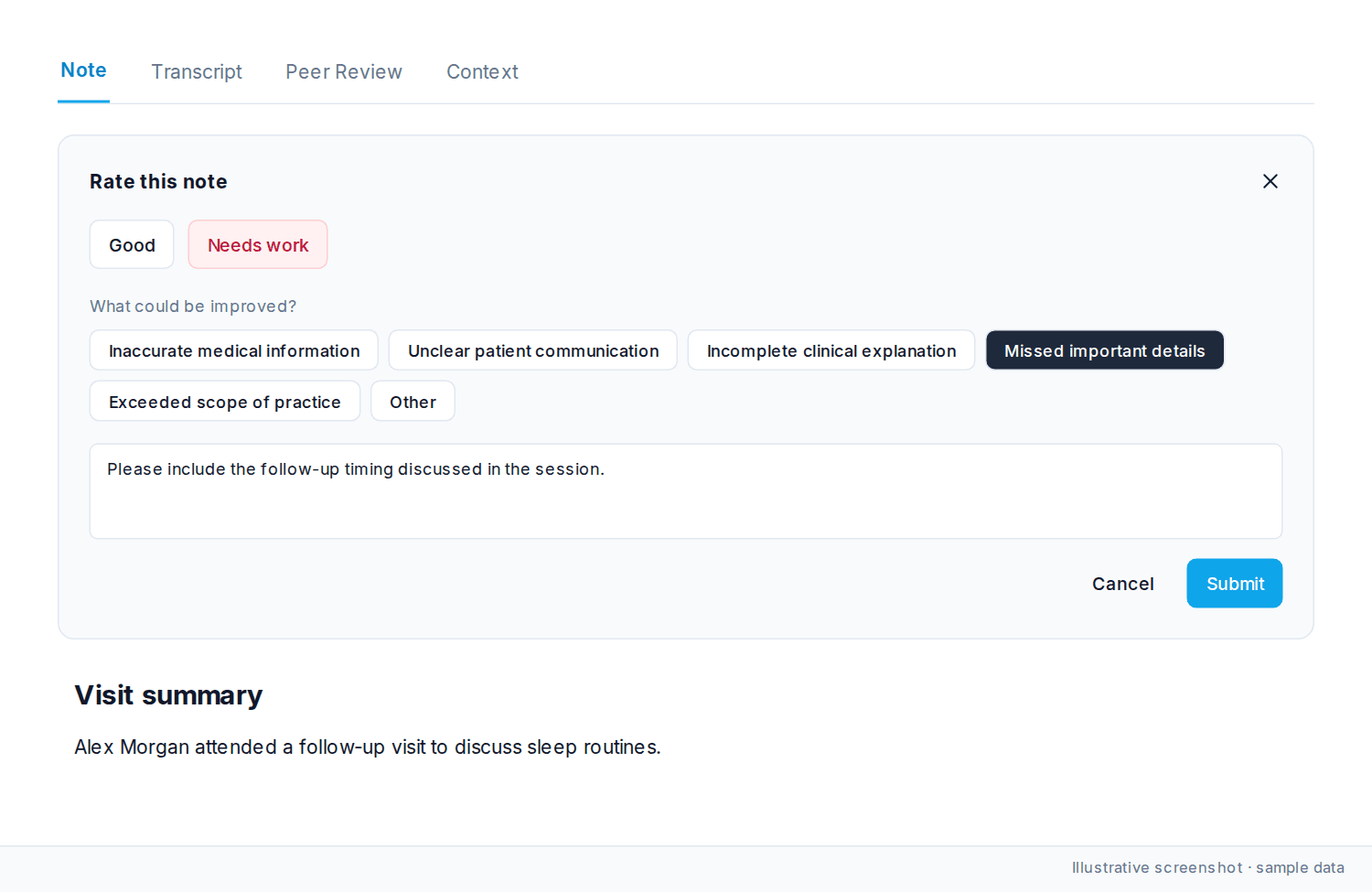
Adding detailed feedback (optional)
Select from predefined categories to explain your rating.
For positive ratings:
-
Accurate medical information
-
Clear patient communication
-
Evidence-based guidance
-
Thorough clinical explanation
-
Followed clinical guidelines
-
Other
For negative ratings:
-
Inaccurate medical information
-
Unclear patient communication
-
Incomplete clinical explanation
-
Missed important details
-
Exceeded scope of practice
-
Other
Adding comments
After selecting a category, you can leave additional comments explaining what influenced your rating.
Ratings and comments teach the system your style. The more you leave, the closer later notes get.
Was this article helpful?
Still stuck? Our team answers in the messenger.